iPhone on Linux
Real, unmodified iOS running headless on ARM Linux, driven by an agent: an emulated iPhone 11 boots Apple's own iOS 14, imports apps built on Linux as real IPAs, takes taps through a virtual touchscreen, and leaves a hashed, reviewed record of every action. Built as ground truth for CommandAGI's emulator and verification infrastructure and for Computerworld.
- Real iOS, not a lookalike. An emulated iPhone 11 boots Apple's own iOS 14 on ARM Linux: the lock screen, SpringBoard, Setup Assistant and the stock Clock app, all unmodified
- Your apps, installed for real. Apps are compiled on Linux against UIKit headers and imported into the device image as IPAs, then launched by iOS like any other app
- Driven by an agent, checked like an experiment. Taps and swipes go in through a virtual touchscreen; every action is captured before and after, reviewed, and recorded with hashes and transcripts
 The iOS 14 lock screen, running in the emulator on Linux
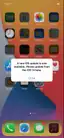 SpringBoard, the iOS home screen
 An app built on Linux, imported as an IPA, before the tap: Count: 0
 The same app after an injected tap on Increment: Count: 1
Problem
An agent that operates a phone has to be tested on a phone. The ways to do that today are a rack of real devices, which can't be snapshotted, scaled or run in a data centre, or Apple's iOS Simulator, which runs only on macOS and runs your app against macOS frameworks rather than the operating system on the device. Neither fits inside Linux infrastructure, where agents are trained and evaluated in their thousands.
I needed iOS as ground truth for two things. CommandAGI's emulator and verification infrastructure has to check that an agent really did what it claims on a real interface, not just that its transcript reads well. And Computerworld, a deterministic simulated computer world for training computer-use agents, draws an iOS shell among its five: to know whether a simulated iPhone behaves like a real one, you need a real one you can drive the same way, headlessly and repeatably.
The first attempt, behavioral-iphone, went the other way: it re-implemented iOS system libraries on a CPU emulator. It reached zero percent parity with a real device, and that taught the lesson. Stop imitating the operating system, and run the real one.
Solution
The emulator underneath is Inferno, ChefKiss's QEMU fork that emulates Apple's ARM devices. It can boot iOS; it does not, by itself, give you an iPhone an agent can use on a Linux server. What I built on top, over seven days and 1,239 commits, is that layer: a companion runner that prepares Apple's firmware into bootable disk images, builds and imports apps, drives the device without a screen, and turns every interaction into evidence.
1/6 Apple's own firmware is staged into disk images on Linux. Nothing in iOS is re-implemented, and nothing Apple ships is redistributed.
How
- Host: an aarch64 Linux machine, CPU emulation only (no hardware virtualization for this device). Each guest gets two virtual CPUs and 4 GB of memory.
- Firmware: the user supplies Apple's iOS 14.0 beta 5 restore image; the tools decode it, stage the system and data volumes, seed the keybag and caches, and never download, decrypt or redistribute Apple's code.
- Apps: built on Linux with clang against hand-written UIKit headers and link stubs, packaged as IPAs and staged into the image. Only your own unencrypted apps: App Store binaries are rejected by design.
- Control: a QMP control channel into the emulator, a virtual multitouch device for taps, swipes and the home button, and a headless display read back as frames.
- Evidence: every journey records its commands, control and display transcripts, timings, before and after screenshots and their hashes, and a review of whether the screen actually changed the way the action claimed. A run that cannot be checked does not count.
Results
Real iOS boots to the lock screen and SpringBoard, completes Setup Assistant screens, and runs the stock Clock app. An app built on Linux installs and runs, and a tap on its button moves the counter from 0 to 1, verified before and after (the screenshots above). A navigation app goes through a full UI journey: opening items, scrolling a list, flipping a switch, saving, and reopening to find the saved state.
 Setup Assistant greeting, on the emulated device
 Welcome to iPhone, Setup Assistant
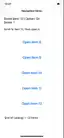 A navigation app built on Linux after a full journey: saved item 12, option on
Two emulated iPhones completed the same strict journey at once on one machine, then idled together using 64.6% of one CPU core on average and 10.76 GiB of memory at peak between them. That is a measured pair, not a capacity limit.
It is a working prototype, not a product. The display intermittently freezes after some runs; the leading hypothesis is that the guest's frame bookkeeping falls out of step and the compositor waits on itself, and it is analysed from saved evidence but not yet fixed. A fresh device takes one to three minutes per Setup Assistant screen in pure CPU emulation. General App Store compatibility is not claimed.
Lessons
The cheapest way to get a real phone's behaviour was to stop modelling it. A week spent re-implementing system libraries bought nothing; a week spent building operational tooling around the real operating system bought an iPhone an agent can use. The other lesson is about trust: an agent that runs a phone will happily report success, so the infrastructure has to be built around evidence from the first day: a before, an after, a review and a hash for every claim.